What is Endstack?
Learn how Endstack brings an AI agent, collaborative channels, native apps, and a persistent cloud desktop into one workspace.
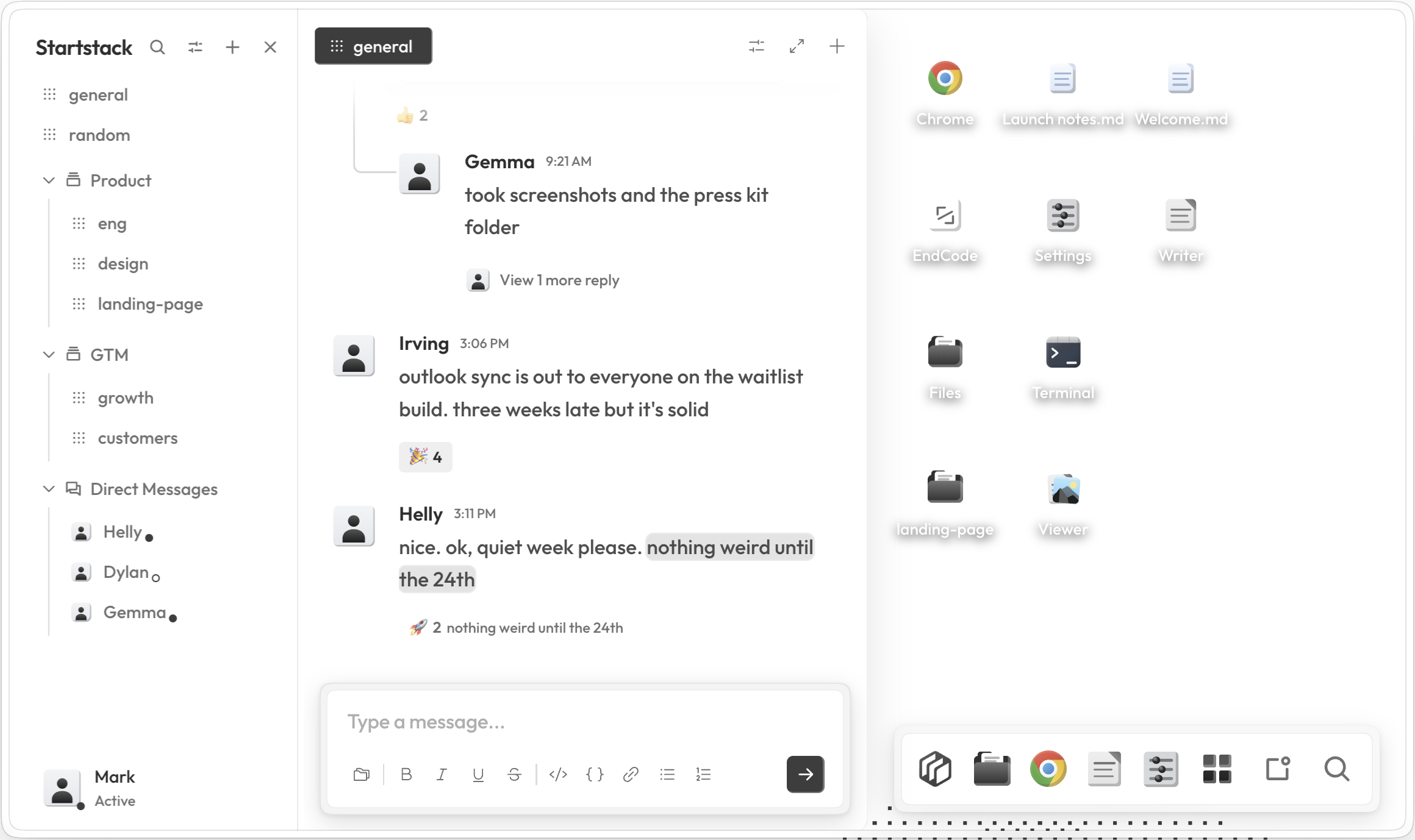
Endstack is a cloud-hosted, agentic workspace. Each member gets a full desktop environment with files, apps, channels, and an agent that can act on their behalf. Each workspace runs endOS, our own desktop environment backed by Linux.
You can access your workspace via web or dedicated desktop and mobile apps.
Endstack at a glance
Agent
The Endstack agent works inside your endOS workspace. Think of it as an extremely smart co-worker. You can DM it for personal use, it can join collaborative conversations in channels, use the built-in Chrome browser, work with your files, load reusable skills, call MCP servers, and use third-party integrations.
You control how freely it can run tools. For sensitive actions, get a push notification to your mobile app and approve on-the-go.
Start recurring tasks on the web and even see the results or cancel the run from your phone.
We even give your agent an email address and phone number to text. Endstack can also directly integrate into Slack.
Channels
Channels are where team members and the agent collaborate. Endstack supports workspace channels, direct messages, scheduled task channels, and channels for each external conversation started through Email, Messaging, or Slack.
You can also customize the agent's context for each channel. Channel owners and workspace admins can also manage privacy, membership, posting permissions, notifications, and proactive agent responses.
Desktop
endOS is a fully customizable, desktop environment: a dock, spotlight search, full file system, and native apps including Files, Writer, Viewer, persistent Chrome browser, Terminal, EndCode, Mail, and Settings. You can run and compile code, install CLI tools, and more, because endOS is built on top of Linux.
Each user's private desktop comes with 50 GB or file system storage. Workspaces also have a separate 50 GB Team Desktop, and items shared directly or through channels appear in Shared with me.
Workspace
Workspace settings cover identity, members and roles, and notifications. Workspace admins can invite members and manage roles, while profile and notification preferences remain personal to each member.
Where configuration lives
| What you want to manage | Where to do it |
|---|---|
| Agent policy, models, skills, MCP, and integrations | Settings |
| Theme, wallpaper, Terminal, and desktop behavior | Settings |
| Channel context, privacy, members, and agent responses | Channel details |
| Files and sharing | Files, Team Desktop, and share dialogs |
| One-time, or recurring scheduled tasks | Task channels - ask Endstack to create one! |
Start exploring
- Follow the Quickstart for a practical first tour.
- Learn what the agent can do and choose an approval policy.
- Set up channels and scheduled tasks.
- Tour the native desktop apps and file sharing.
- Configure your profile, members, and notifications.